WordPress to React CMS Blocks Migration
Translating current WordPress blocks to React to improve efficiency and user experience
Role
Software Developer
Client
Freshbooks
Timeline
May 2021 - May 2022

Question
Does migrating the WordPress blocks to React improve efficiency and user experience for the webpage editors?
Overview
Opportunity
The web operations (web-ops) team at FreshBooks uses WordPress, a content management system (CMS) to layout, edit, and publish their webpages. The current CMS page does not give editors the flexibility to customize the layout for different marketing campaigns, which adds more work for the developers to make content changes.
As a software developer, I was responsible for translating the existing blocks’ PHP files into React, while still maintaining the original functionality of the Advanced Custom Fields (ACF) blocks.

20+ Tickets to Development
The marketing team sends a large number of Jira tickets to the development team for minor content issues.

No Flexibility
The current CMS page is difficult to use and is not customizable for different campaigns.
Goal
This project had two main goals. One is to improve user experience for the editors to easily modify the blocks and edit the webpages, without having to ask the developers to fix small marketing issues. The second goal is to separate the backend from the frontend. With the current setup of blocks, both the backend and frontend are merged into one PHP file.

Improve User Experience
Make the CMS page easier for editors to change content, modify blocks, and edit webpages on their own.

Modularity
Separate the frontend and backend to avoid conflicting and overlapping changes.
Solution
The final solution consists of a PHP backend, Moustache template file, and React file to handle the frontend and logic.

PHP
File that is built on the current WordPress blocks template.

Moustache
Template file to help the WordPress PHP file communicate with the React file.

React
Adds modularity and flexibility to the CMS page for editors.
Engineering Analysis
Ideation
The website editors found the current ACF blocks to be difficult and limiting to use. This led to the editors regularly filing tickets to the development team to fix minuet issues. Another problem the team was facing was the current setup of blocks combined both the backend and frontend. It was hard for developers to collaborate without messing up each other’s work.
Many of the developers on the team believed that implementing React would open possibilities on how the blocks are created and had the potential to improve user experience for the editors.
Concept
The current blocks use the ACF WordPress plugin that allow website managers to customize the data fields using a simple UI. The developers decided to incorporate this resource since it would be much easier to use the pre-existing custom field data rather than creating it completely from scratch.

Requirements
01
Blocks must take less time to load than current ACF blocks (~3s)
02
Blocks must improve user experience for webpage editors
03
Blocks must use React whether it be a few components or completely translating the existing blocks

Constraints
01
Blocks can not take more than 3s to load on the editor and frontend side
02
Blocks must not be more difficult to use than the current ACF blocks
03
The blocks' frontend and backend can not be in the same file
Success Metrics
Success metrics were defined at the beginning of the project to validate each design decision. The team decided to use the current ACF blocks as a benchmark for the new blocks to compare to. Since the website editors are already familiar using the ACF blocks, the team wanted to keep the same comfortability level and did not want to invest in training the editors on how to use the new React blocks.

Efficiency
Efficiency will be measured in the time it takes for the blocks to load on the editor side and frontend side.

User Experience
User experience will be determined by feedback from the editors after usability testing.
Design
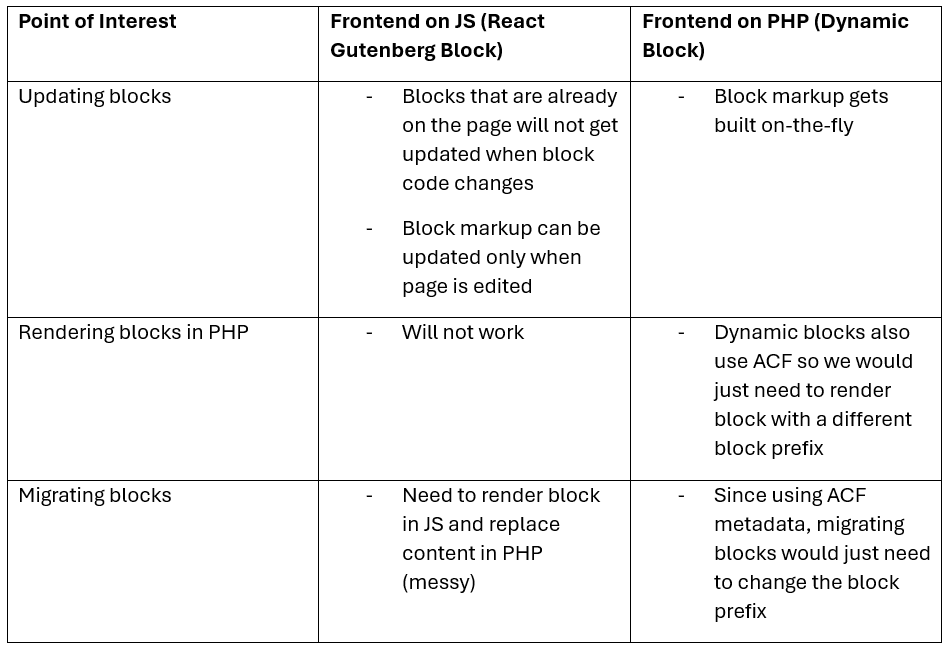
Two design options were presented. One option was to convert the entire PHP file to React. This would mean that all information held in PHP would need to be translated to JavaScript and still somehow function with WordPress. The other option was to create the CMS using PHP, with some React components incorporated on the editor’s side. Even though this is not fully React, it showed some promises as the majority of WordPress’s functionality runs mainly on PHP.
Development
The first iteration of the design cycle was to carry out the standard implementation of React Gutenberg blocks. This meant converting the current PHP blocks into full JavaScript. While the second iteration of the design cycle was to incorporate some React components while still maintaining the PHP functionality. With a proof of concept laid out, the team and I worked to create prototypes of both options using very simple blocks and documented the findings with the team.
Designed Solution
Iteration #1
The first iteration of the design solution had both PHP and JavaScript files with the Mustache file as the interface. The JavaScript file would handle everything on the editor’s side of WordPress, where the editors would use blocks to create the FreshBooks webpages. Developers can customize what goes into the sidebar and what fields can be edited directly on the webpage block. As for the frontend, it is implemented using PHP. Once the editor saves the page they are working on, the frontend is how the page is previewed by users and people who visit the production website. The Mustache file is used to hold the pure HTML code template for both languages. Information from both the PHP and JavaScript side can bidirectionally communicate on the editor and frontend side.
PHP
File that is built on the current WordPress blocks template.
Moustache
Template file to help the WordPress PHP file communicate with the React file.
React
Adds modularity and flexibility to the CMS page for editors.
Pros
Separated the frontend from the backend, while still maintaining the WordPress functionality.
Cons
Duplication of code in both PHP and JavaScript files for the editors and frontend sides.
Iteration #2
As more complex blocks were created, new solutions were incorporated to solve certain problems the developers ran into. The ACF fields that caused issues during this migration led to the implementation of Redux, which improved the UI of the webpage blocks.
RepeaterField
This field is used to add multiple templates to the block however was difficult to implement since there was duplication of code on both the PHP and JavaScript side. We solved this problem using the useReducer hook from React. It solved the issue of having multiple complex state logic and led to cleaner quality code since the developers can namespace their different states. Moving forward, this useReducer hook would be used for any blocks that dealt with the RepeaterField.
RichText
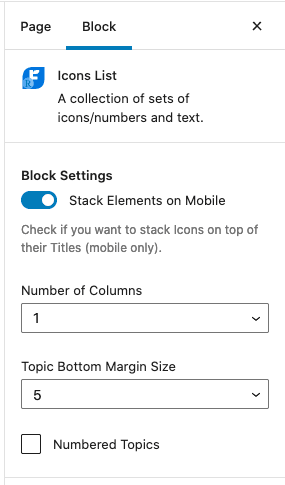
In the previous ACF blocks, text was added to the block using an input field in the sidebar. However, in the new ReactJS blocks, the editors can manipulate text directly on the block with a live preview as shown below They can focus on the block they are working on without having to look over at the sidebar.
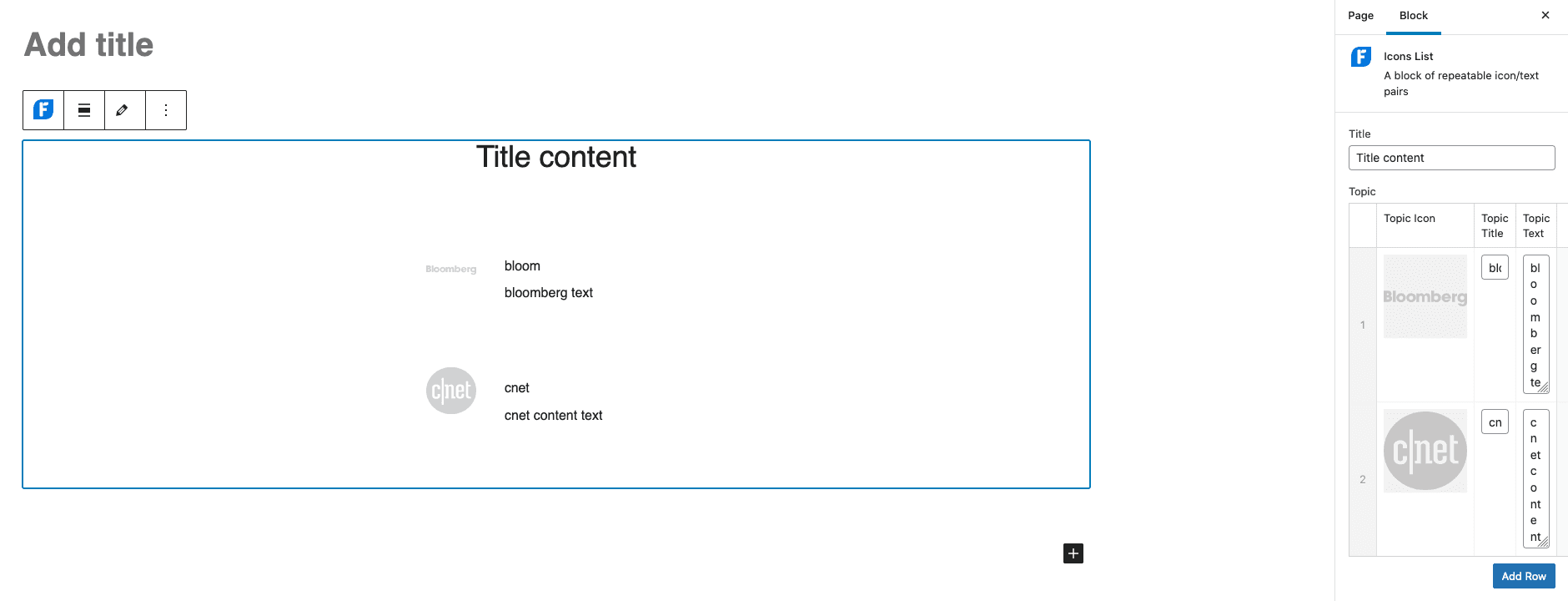
Figure 1: Old ACF blocks where editors had to change content in the sidebar.
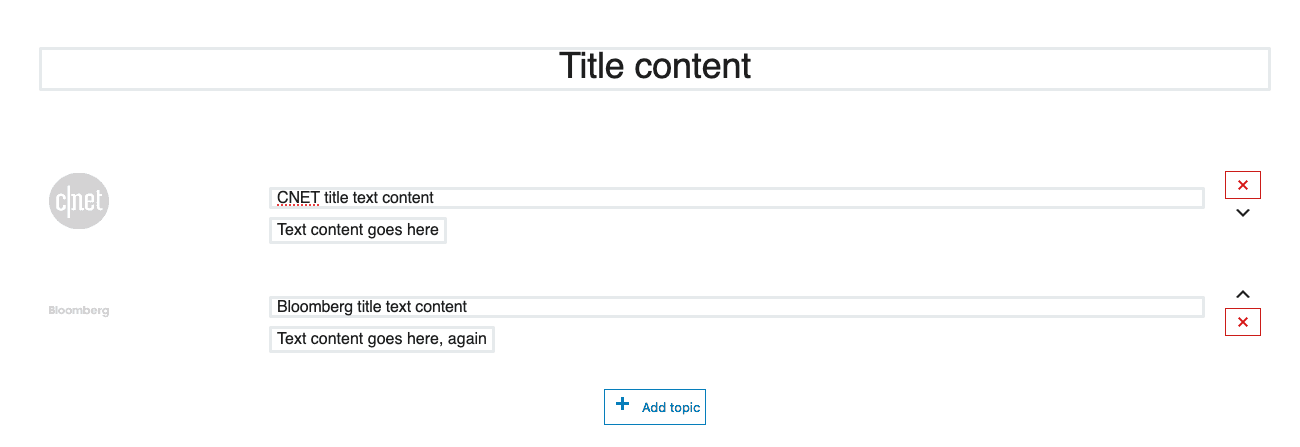
Figure 2: New React blocks where editors can edit text directly in the block
Verification
Loading Times
As the team converted more and more blocks to React, the outcome showed promising results. Converting the PHP blocks to React simply removed a lot of Ajax calls from the editor’s side and sped up loading times. Loading time only had an impact on the editor’s side and will significantly impact larger blocks that often take ~10s to load.

Usability Testing
Usability testing was conducted amongst the webpage editors who have previously used the ACF blocks. Based on their feedback, the fast load times was favourited since they did not have to wait for the blocks to load and they were readily available to edit its content.
Another React feature that the editors enjoyed was the use of the RichText component. In the previous ACF blocks, text was added to the block using an input field in the sidebar as shown in Figure 1. However, in the new React blocks, the editors can manipulate text directly on the block with a live preview without having to look over at the sidebar.
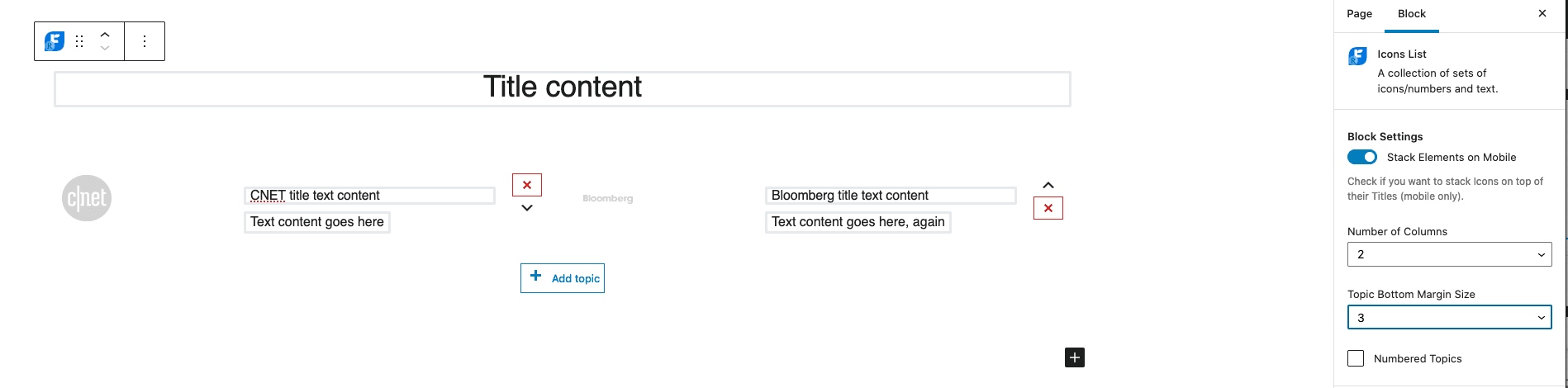
Figure 3: The new React blocks allows webpage editors to edit text and add new components directly in the blocks.
Feedback
"Seeing the text in the live preview makes it so much easier to edit content and catch mistakes"
-Webpage editor
"I like that I can drag and drop columns and change the grid layout with content before publishing"
-Webpage editor
Conclusion
The React migration was successful and addresses the situation of concern altogether. The final design solution that includes a PHP file for the frontend, JavaScript file for the editor’s side, and a Mustache file as the template interface provided a workaround to leverage the current ACF block field data to the developers’ advantage. On the editor’s side, React provided flexibility to create a more user-friendly UI. Based on feedback, the faster loading times and easy-to-use UI verified the success of the overall project. Editors are now able to do more on their own when fixing webpages, which in turn reduces the number of tickets issued to the web-ops team. Subsequently, the developers can focus on bigger, more important projects and issues in the future. React has opened many possibilities to add special features and engineer the blocks that continue to improve user experience for the editors.
Recommendations
Implementing React into the web-ops tech stack has shown promising improvements to the UX of the webpage blocks and production build. Here are some recommendations that I compiled moving forward with the project.
Handlebars
Pros
Creates semantic templates that contains logic and helpers which will reduce the duplication of code and keep all the logic in one file.
Cons
This template engine may be harder and take longer to configure since it uses server-side JavaScript rendering and precompiling.

TypeScript
Pros
Help catch errors and bugs early during the Jest test cases by enforcing strict typing and clearer contracts between components.
Cons
Requires configuration, type definitions, and compilation, which can slow down development especially for small projects or quick prototypes.