Implementing Bulk Action Features on Autodesk Construction Cloud
Improving the user experience for the photos and markups tabs on ACC
Role
Frontend SWE
Client
Autodesk
Timeline
Sept 2022 - Dec 2022
Question
How can we implement Bulk Action Features for both Photos and Markups on Autodesk Construction Cloud?
Overview
Problem
The Markups team owns two components of Autodesk Construction Cloud; Photos, where users can upload and save photos of their project in the cloud, and Markups, where users can add, view, and manage annotations on construction documents such as drawings, plans, and 3D models. Currently, in photos users are only able to delete photos one at a time, with each photo taking around four seconds to delete. While in markups, copying and pasting annotations can only be done one at a time and using the right mouse button.
As a frontend software engineer, I was responsible for building out the first milestone of the Bulk Actions project in Photos and Markups. This would allow users to delete multiple photos at a time and copy and paste multiple markups at once.

No Multi-Select Option
There is no option to select multiple photos or markups at a time to manipulate.

Delete Photos One at a Time
Photos can only be deleted one at a time, which takes about 4 seconds per photo.

Duplicate Markups One at a Time
Markups can only be duplicated using the right mouse button, which takes about 5 clicks for each annotation.
Goal
The goal of this project is to allow users to manipulate photos and markups in bulk. Success will be measured in time efficiency and user feedback from usability testing.
Solution
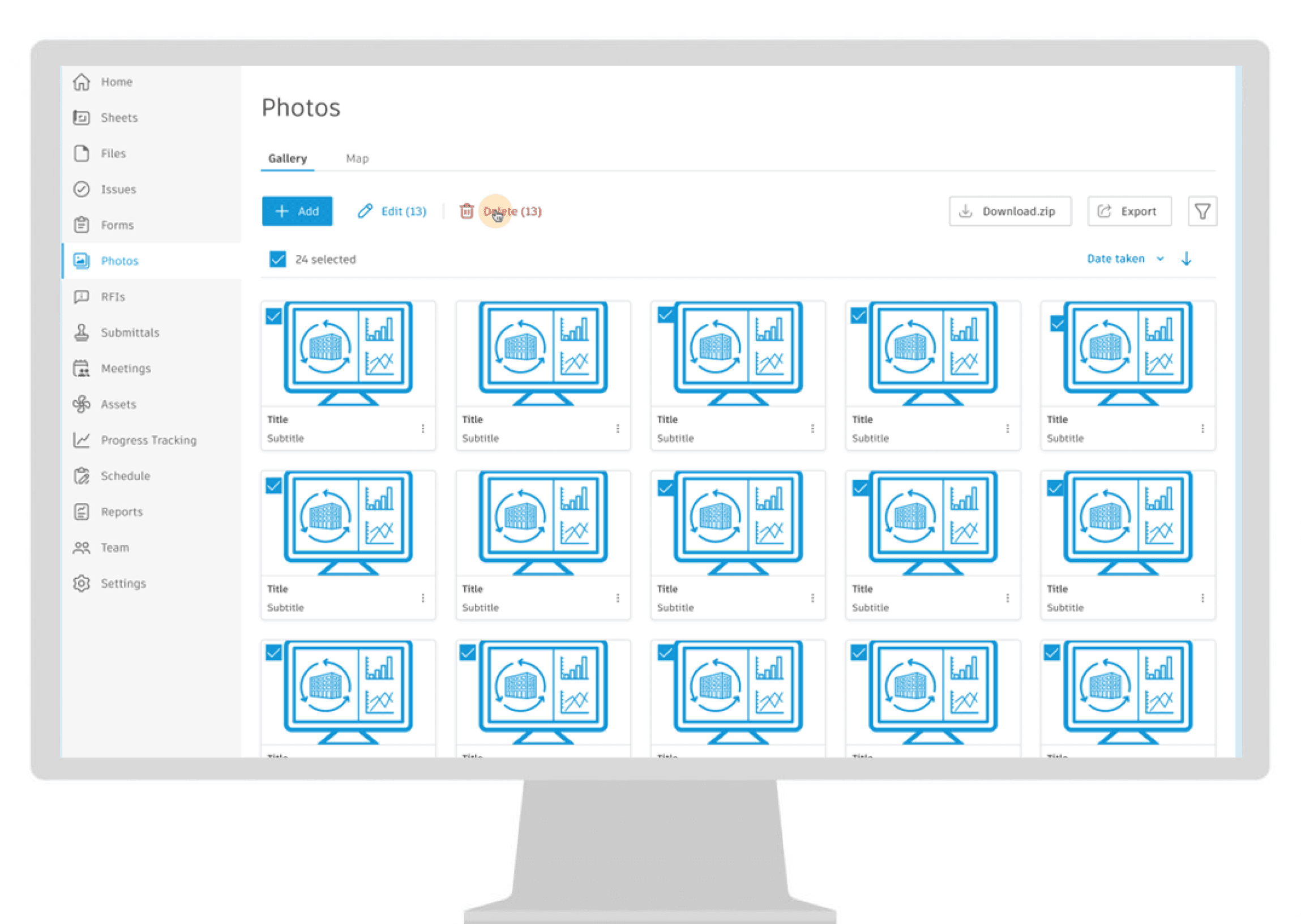
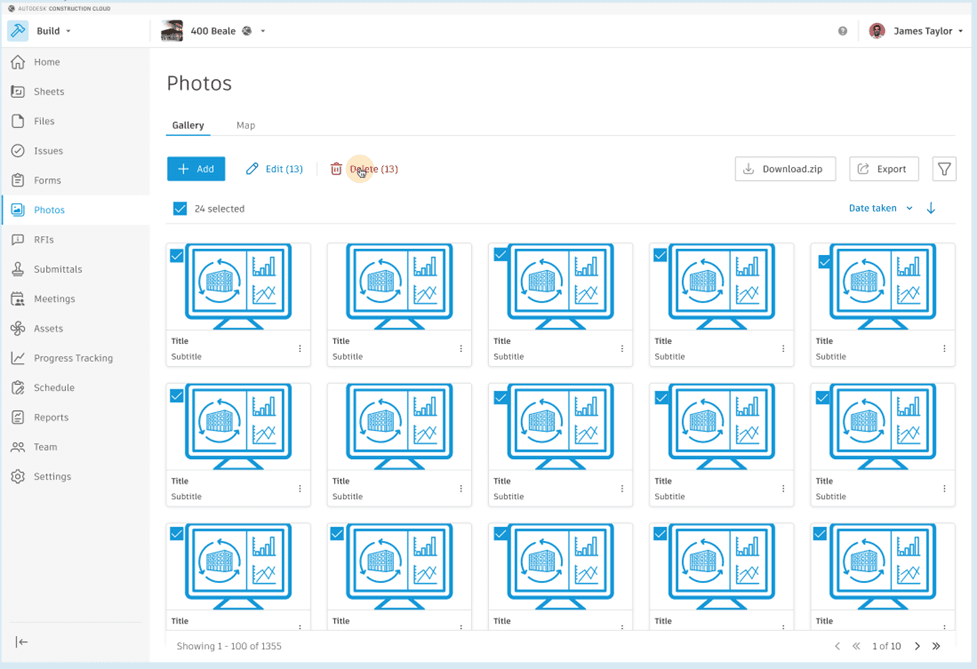
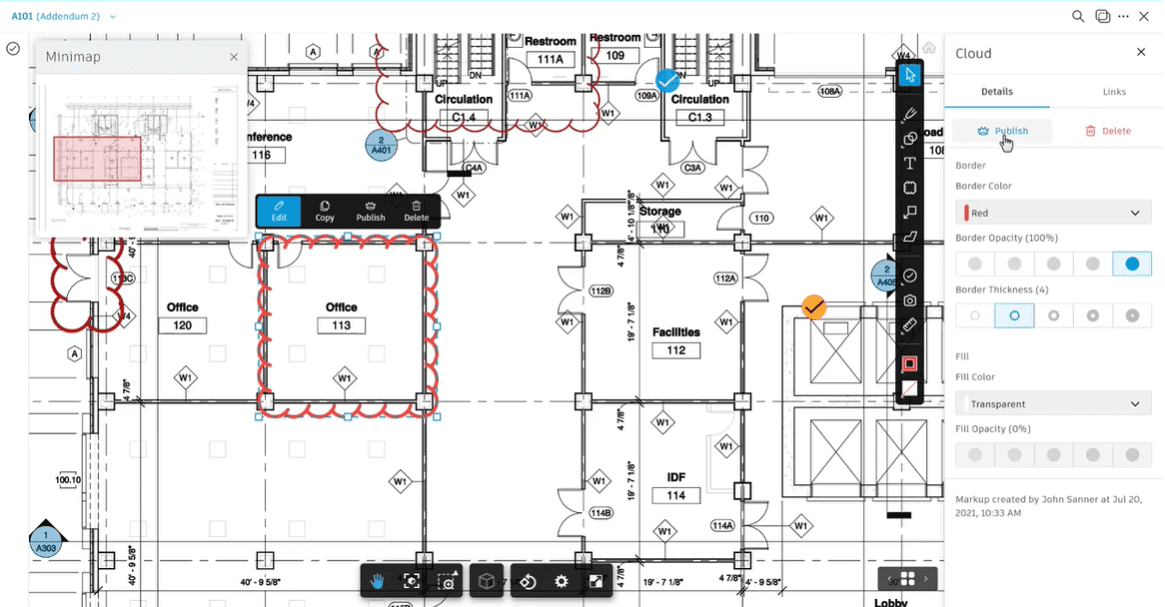
The final solution of the bulk action features was implemented in photos and markups. In Photos, multiple photos can be deleted at once. In Markups, multiple markups can be copied and pasted using the 'ctrl + c' and 'ctrl + v' keyboard shortcuts.
Bulk Delete in Photos
Bulk Copy and Paste in Markups
Design Process
This analysis will focus on the Bulk Delete project in the Photos tab.
Ideation
Current users have voiced their concerns with deleting multiple photos on a project. Since photos can only be deleted one at a time, having to delete more than 3 photos, becomes a very tedious and mundane task. Each photo takes about 4 second to delete and for the average construction project with 100+ photos, can be a nuisance for many users.
The markups teams decided to implement a new bulk action feature to photos, starting with delete.
Product Specs
As a user, I want to be able to select multiple photos and delete them all at once.

Requirements
01
Must take less than 7s to delete all the selected photos
02
Must be intuitive for the users to use
03
Must be easy to use
04
Must use a seperate bulk delete API
05
Must use GraphQL implementation
Constraints
01
Must not take longer than it takes to delete photos one by one
02
Must not be confusing to use
Success Metrics
Success metrics were defined at the beginning of the project to validate each design decision. The team decided to use the current deleting a photo process as a benchmark to compare to. Success of the project will be determined by whether users will be able to delete multiple photos in less time than it takes to currently delete photos and whether they found the new feature to have improved their experience using ACC.

Efficiency
Efficiency will be measured in the number of clicks and time it takes to delete multiple photos.

User Experience
User experience will be measured by feedback collected from user interviews during usability testing.
Backend
A new Bulk Delete API for photos was created to delete multiple photos using one API call. Using the old delete single photo API would not be efficient since it would have had to be called multiple times, sending too many requests to the backend. This also avoids the need to manage endpoints for different resources.

Single Photo Delete API
The current delete photo API only accepted 1 photo to be deleted at a time.


Bulk Photos Delete API
The new API can take in an array of the selected photos and delete this information using one API call.
Frontend
There were three subsections for the frontend, a new GraphQL mutation, the action buttons, and status notifications.

New GraphQL Mutation
A new GraphQL mutation was created to allow users to modify or change data on the server and call the new Bulk Delete API to send one delete request to the backend.
Action Buttons
New action buttons, checklist selection, photo gallery, pop-ups, and toast messages were used from the ACC library to keep each section consistent.

Status Notifications
Status notifications were added to Bulk Delete for user error handling and UI indications.
Testing Party
Once a prototype of Bulk Delete was completed, a testing party was held with the Markups team and other stakeholders. During a testing party, a dedicated time slot, ~1 hour, is scheduled for everyone to use and play with the new feature at the same time, and a document is shared, where members can write the issues and bugs found while testing. After, the team goes through the list of issues and collectively brainstorms feasible solutions.
Here are some of the solutions that came from this testing party that will be incoporated in the second iteration.

Loading Spinner
A loading spinner needed to be added to the photo gallery which will let the users know that their photos are currently being deleted.

Refactor API Request
The API request needed to be refactored to limit the amount of times that it is calling the backend.

Update Home with Deleted Photos
On the homepage, the photos gallery should be updated with the deleted photos removed.
Deployment
Before releasing the new feature, the new tickets from the testing party are prioritized. Once all the issues from the testing party are fixed, the code is ready to be tested one last time by the product managers and lead QA. If testing is passed, the feature is released to staging and then deployed for the 1M+ ACC users.
Designed Solution
After a few iterations of the design process and Autodesk’s standard feature development practices, the Markups team was able to build out, test, and release Bulk Delete for photos. In this design solution, the user can select multiple photos from their photo gallery and click on the delete action button to delete all the selected photos at once. The final design consisted of a new delete action button, the ability to select multiple photos at once, a confirmation pop-up, error handling toast messages, and a spinner to show the status of the deleted photos.
Figure 1: Photos gallery with delete button and multi-select option.
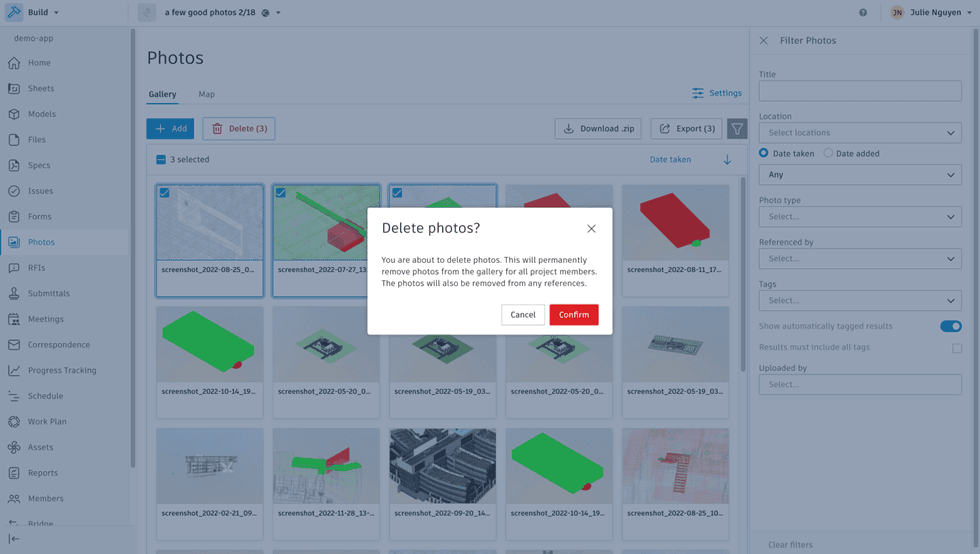
Figure 2: Toast message after choosing to delete multiple photos.
Verification
Time Efficiency
Bulk Delete for Photos was a successful outcome that makes it much easier for users to delete multiple photos, decreasing the time by over 80%. Before, it would take around 4 seconds to delete a single photo, and if a user wanted to delete multiple photos, they had to delete them one at a time. Now with Bulk Delete, it takes 3 seconds for all the photos to be deleted at once.
Usability Testing
I held usability tests with some current ACC users and based on the feedback, many users stated that the Bulk Delete feature made it much easier and clearer on how to delete photos. It also saved them a lot of time and frustration. The feature gained a lot of positive feedback and anticipated a successful start to the entire Bulk Actions project.
Impact
Here are some numbers from the launch.
80%
of time saved deleting multiple photos compared to before
1M+
ACC users can now select and manipulate multiple photos at a time
5x
less API calls to the backend to delete multiple photos
Limitations
Long Load Times
One limitation is the fact that the deletion of multiple photos takes longer to update in the current photo gallery. A quick fix for this was to add the loading spinner as a status notification. However, the more photos that are selected, the longer it takes for the photo gallery to update. As a user, I want to delete multiple photos within a reasonable amount of time. This could be due to unorganized code in the backend or too many requests being sent to the backend.
Recommendations
With the success of Bulk Delete, the next actionable step would be to use the same technology and engineering methods for other milestones in the Bulk Actions project including Bulk Add and Bulk Edit.
GraphQL Mutation
Continue using a GraphQL mutation in the frontend to handle other bulk action features like Add or Edit.

Separate API Endpoints
Having separate single and bulk action endpoints simplifies calls to the backend and gives users flexibility.
Keyboard Shortcuts
Incorporate keyboard shortcuts such as 'ctrl + c' and 'del' to quickly add and delete photos using keys.
The risks and benefits for this recommendation to carry out for other Bulk Action Features are listed below.

Benefits
01
Consistent codebase with other ACC teams using GraphQL
02
Mitigate risks as engineers can foresee issues and use documented solutions for other bulk action features
03
Engineers can develop miles with more certainty and clarity
04
Code is more legible with separate API endpoints for single and bulk actions

Risks
01
May cause delays in the backend if dealing with a large number of photos or other assets
02
Too many API endpoints can be confusing for each feature and action
Acknowledgements
I would like to acknowledge Shayan Javadi, Mark Xavier, Nick Young, and May Yang who taught useful design and development principles and contributed to the mentoring of this project.
The same design process was used in the Markups tab which allowed uses to select multiple annotations on a markups page and copy and paste them using keyboard shortcuts. This project milestone was also completed during my time at Autodesk.